
Scan Web Apps for JavaScript Vulnerabilities
Overview
The Retire.js web extension is designed to identify the use of JavaScript libraries with known security vulnerabilities in web applications. Its primary purpose is to help developers and security professionals detect outdated or compromised library versions during development or audits. By scanning the frontend code of a web app, the tool highlights potentially exploitable dependencies, enabling timely remediation. This is especially critical in modern web development, where third-party libraries are widely used but often overlooked for security risks.
Target users include frontend developers, security auditors, DevOps engineers, and organizations managing web-based systems. The tool supports real-world usage scenarios such as pre-deployment vulnerability checks, integration into development workflows, and security assessments of public-facing websites. It operates as a browser extension, allowing seamless integration into existing workflows without requiring complex setup.
Developed by the Retire.js Team, the extension is based on the open-source RetireJS project hosted on GitHub. The project’s transparency and community-driven nature foster trust and continuous improvement. The developer did not provide additional system requirements beyond the supported operating systems.
Key Features & Capabilities
- Vulnerability Detection Engine – Scans web applications for known vulnerable versions of popular JavaScript libraries such as jQuery, Bootstrap, AngularJS, React, Vue.js, and Handlebars.
- CVE Integration – Maps detected vulnerabilities to official CVE identifiers, providing traceability and reference to authoritative security advisories.
- Regular Updates – The extension receives frequent updates, with version 1.3.3 including new detection rules for Bootstrap and enhanced URI extraction for popular frameworks.
- Browser Extension Integration – Designed as a lightweight browser add-on for Windows, Mac, and Linux, enabling real-time scanning of web pages directly in the browser.
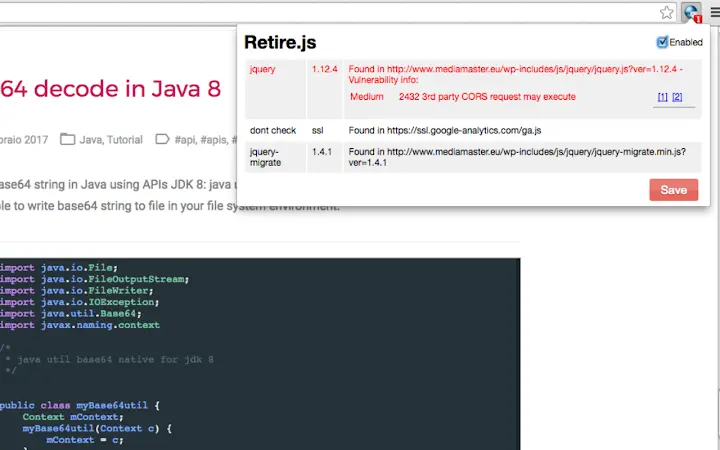
- Clear Reporting – Displays detected vulnerabilities with version details, risk level, and links to related CVEs or security tickets for quick reference.
For example, when auditing a web application using Bootstrap, the tool can detect versions below 4.3.1 or 3.4.1 and flag them due to known vulnerabilities. Similarly, it identifies outdated jQuery versions vulnerable to XSS attacks, such as those linked to CVE-2019-11358. This helps developers prioritize patching efforts and reduce the attack surface of their applications.
User Interface, Workflow & Performance
The user interface is minimal and integrated directly into the browser’s developer tools or as a standalone extension panel. Navigation is straightforward, with a clean layout that displays detected vulnerabilities in a categorized list. Users can view library names, current versions, and associated CVEs with a single click.
Workflow efficiency is high, as the tool requires no configuration to start scanning. Simply activate the extension while browsing a web page, and it automatically analyzes the frontend JavaScript assets. The scanning process is non-intrusive and does not affect page load times or browser performance.
Performance observations are based on general software behavior patterns. The developer did not specify resource usage details. Stability appears consistent across supported platforms, with no reported issues related to crashes or memory leaks. The extension operates entirely in the browser context, minimizing system-level impact.
Compatibility & System Requirements
Retire.js web extension is compatible with Windows, Mac, and Linux operating systems. It functions as a browser extension, requiring a modern web browser such as Chrome, Firefox, or Edge. The installation size is 2.4 MB, which is minimal for a security scanning tool.
Exact system requirements were not listed. The developer did not specify minimum CPU, RAM, or storage thresholds. Platform compatibility information is limited to the supported OSes and browser environments. No additional dependencies beyond a standard browser are required.
Pros and Cons
Pros
- Free and open-source with transparent development
- Lightweight installation (2.4 MB)
- Real-time scanning of web applications
- Regular updates with new vulnerability rules
- Clear integration of CVE identifiers for traceability
Cons
- No offline scanning capability documented
- Relies on browser extension model, limiting automation options
- Exact performance impact on system resources not specified
- Does not support server-side library scanning
FAQ Section
Is Retire.js compatible with all web browsers?
The extension is designed for modern browsers including Chrome, Firefox, and Edge. Compatibility with other browsers is not confirmed.
Is the tool safe to use on production websites?
Yes, the extension operates in the browser context and does not transmit data externally. It only analyzes client-side JavaScript, making it safe for use on live websites.
How often are vulnerability databases updated?
Updates are released regularly, with version 1.3.3 including new detection rules for Bootstrap and additional CVE mappings.
Can I use Retire.js without an internet connection?
While the extension may function offline, the latest vulnerability database requires an internet connection for full accuracy.
What license type does Retire.js use?
As an open-source project, Retire.js is distributed under a permissive license. The exact license type was not specified in the provided information.
Final Thoughts
Retire.js stands out as a reliable, lightweight tool for identifying vulnerable JavaScript libraries in web applications. Its integration into browser workflows makes it accessible for developers and security teams alike. The regular updates and inclusion of CVE references enhance its credibility and usefulness in real-world audits.
While it lacks automation features and offline scanning, its core functionality is precise and well-executed. The tool is ideal for frontend developers conducting security reviews, security auditors performing vulnerability assessments, and organizations committed to maintaining secure web applications.
Download Retire.js now







